How to add decorations to letters

Hello,
"Pu ("Pu" is a half-width kana)".
(You don't have to pronounce the part of ("pu" is a half-width kana))
In this article, we will show you how to easily decorate letters in Illustrator.
Contents
- 1 (1) First, prepare the letters you want to decorate 2 (2) Outline the letters3 (3) Draw curves with the pencil tool4 (4) Thicken the roots with the line width tool
- 5 (5) Outline
- the path6 (6) Combine letters and lines in the pathfinder
- 7 (7)Simplify the path and smooth
- the characters8 (8)Complete
- 9 Conclusion
Contents
(1) First, prepare the letters you want to decorate
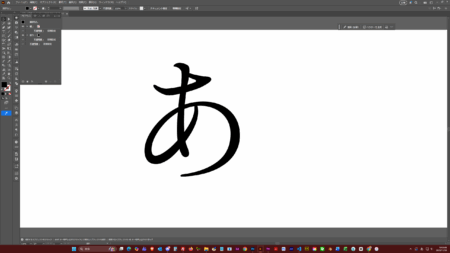
First, prepare the original letters.
This time, I will add decorations to the Ming Dynasty body.
Outline (2) characters
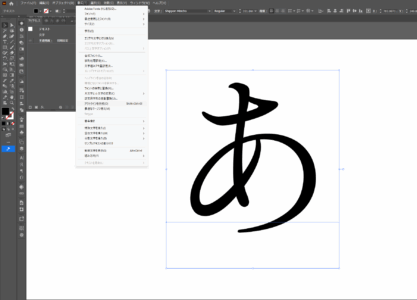
Outline the characters.
(3) Draw curves with the pencil tool
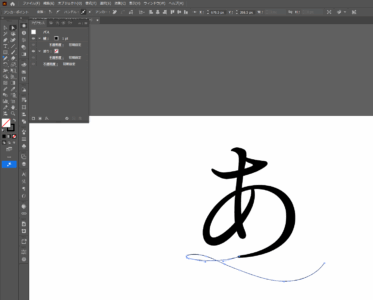
Use the pencil tool to draw a curve like that.
(4) Thicken the roots with the line width tool
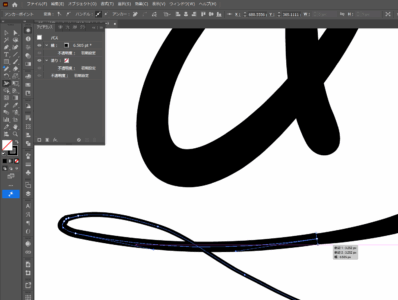
the base thicker and connect it with the end of the letter.
Outline (5) Path
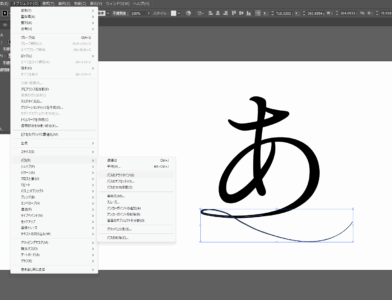
Outline the path.
(6) Combine letters and lines with pathfinder
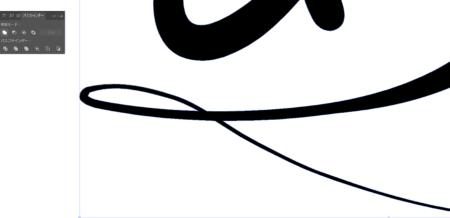
Use the pathfinder to combine letters and lines.
(7) Simplify the path and smooth the characters
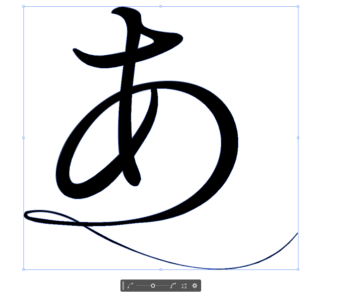
Simplifying the path smooths the joint.
(8)Done

Here is the finished product.
summary
what did you think?
In order to become a top-notch designer, it is essential to devote yourself every day.