Don't rely on apps! Easy drone flight log on the web! ! ~A must-see for Android users

Hello! I'm Rikki ~ who is a drone pilot at PIPELINE Co., Ltd.
I also got a drone qualification, but
I got a drone license and bought a drone!
drone registration and comprehensive application from the Ministry of Land, Infrastructure, Transport and Tourism have also ended!
Now~ I'm going to fly!
When you say that, there are quite a lot of things you must do~
Of course, adjusting the flight location, applying for a flight plan, and contacting the police and sometimes the local community< br/> The most troublesome thing is creating a "flight log".
This is very difficult, isn't it?
It's okay to write by hand, but I want to reduce my luggage to go to the site as much as possible, and it may be difficult to write depending on the situation...
be stored digitally and shown whenever I am told, so I want to make it as digital as possible.
But it doesn't get in the way to hit it by hand.
(*Sorry.) It's a troublesome shop~. )
In such a case, wouldn't it be nice to be able to complete everything with a
smartphone?
thought.
Contents
Contents
Flight Logbook on Android!
After all, it seems that there are many people who think the same way.
There are various apps for journaling, and there was a lot of information on the web.
Oh~ this is it! I found the information, but unfortunately I combined my iPhone with Google Form...
Apparently it doesn't work on Android.
There are a lot of apps, but it's a waste of money...
I'm a die-hard Android user, and how can I get it on Android for free... I was worried.
So, first of all, I tried various trials and errors with GoogleForm, but I myself am not familiar with GoogleForm, and it is troublesome to understand and script from scratch, and it takes a bit of time to do it...
So, why not use our strengths to do something about it using the WordPress plugin ContactForm7? I thought about it and made it.
There is no problem because you can go to simple items by using checks, radio buttons, and ConditionalFields, but there are three difficulties.
- Buttoning of take-off and landing location measurement
- Buttoning of take-off and landing time measurement
- Automatic calculation of flight time
These are three points.
If you manually enter here, the name of the troublesome shop will be lost!
As long as there is nothing wrong with the drone, I want to complete everything with a tap!
My troublesome soul was ignited, and I made three scripts myself!
Sold on note! I thought, but probably there are many people who are in trouble.
So, I'll publish them all!
[Please note the following before viewing.] 】
*All of them have been tested, but please note that we do not guarantee the operation.
*We cannot accept questions about the program.
*For those who can install WordPress on the server, those who have used Contact Form 7, and those who say that they will touch HTML for a while~.
If you can't do it, you will be charged, but we will support the installation of WordPress ~ flight logbook, etc., so please feel free to contact us > .
Automate take-off and landing location measurement >
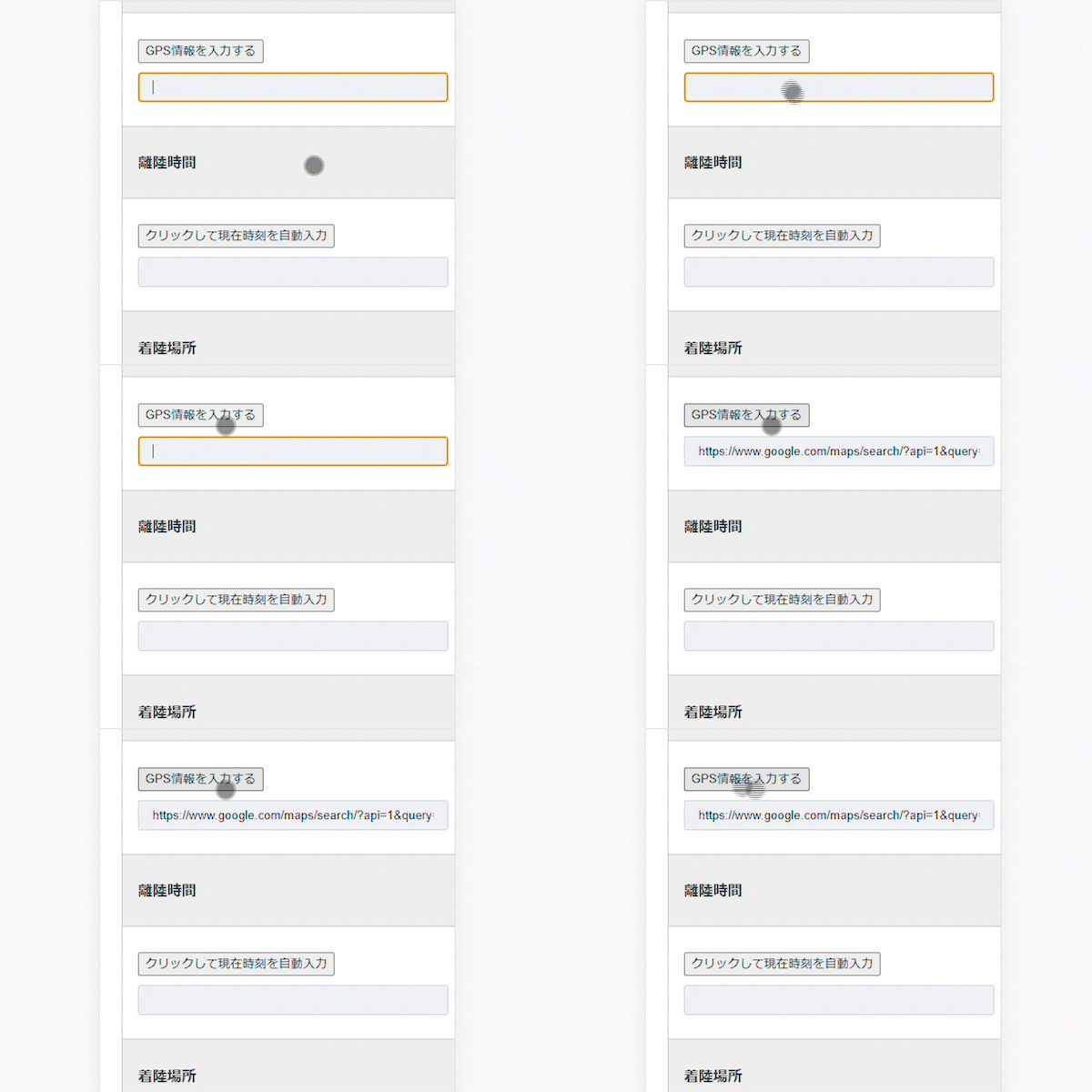
< goal is to become like this>
First of all, it is a method of measuring the location of takeoff and landing, but I have researched various things, but in the end it seems that the only way is to embed a script.
Embed the following script in your contact form:
<script>
function setLocation(fieldName) {
if (navigator.geolocation) {
navigator.geolocation.getCurrentPosition(function(position){
var lat = position.coords.latitude;
var lng = position.coords.longitude;
var mapUrl = "https://www.google.com/maps/search/?api=1&query=" + lat + "," + lng;
document.getElementById(fieldName).value = mapUrl;
});
} else {
alert("Geolocation is not supported in this browser.");
}
}
</script>
Now you have a button that incorporates the URL of Google Map.
This is quite POINT, and later I download a CSV from Flamingo and paste it into a spreadsheet, etc., and when I click on it, I can jump to Google MAP.
If it was just latitude and longitude, where did it take off and land immediately? I don't know, so I'm doing this.
The next problem is how to shortcode this script.
Then, write the following in the field field of the contact form.
<input type="button" value="Enter GPS information" onclick="setLocation('takeoff-location')">
[text takeoff-location id:takeoff-location class:takeoff-location]
This way, you can automatically enter this information just by tapping on the button.
*The tag above is the take-off location, but if it is a landing location, please change the wording of takeoff-location to landing-location, etc.
automate take-off and landing time measurement
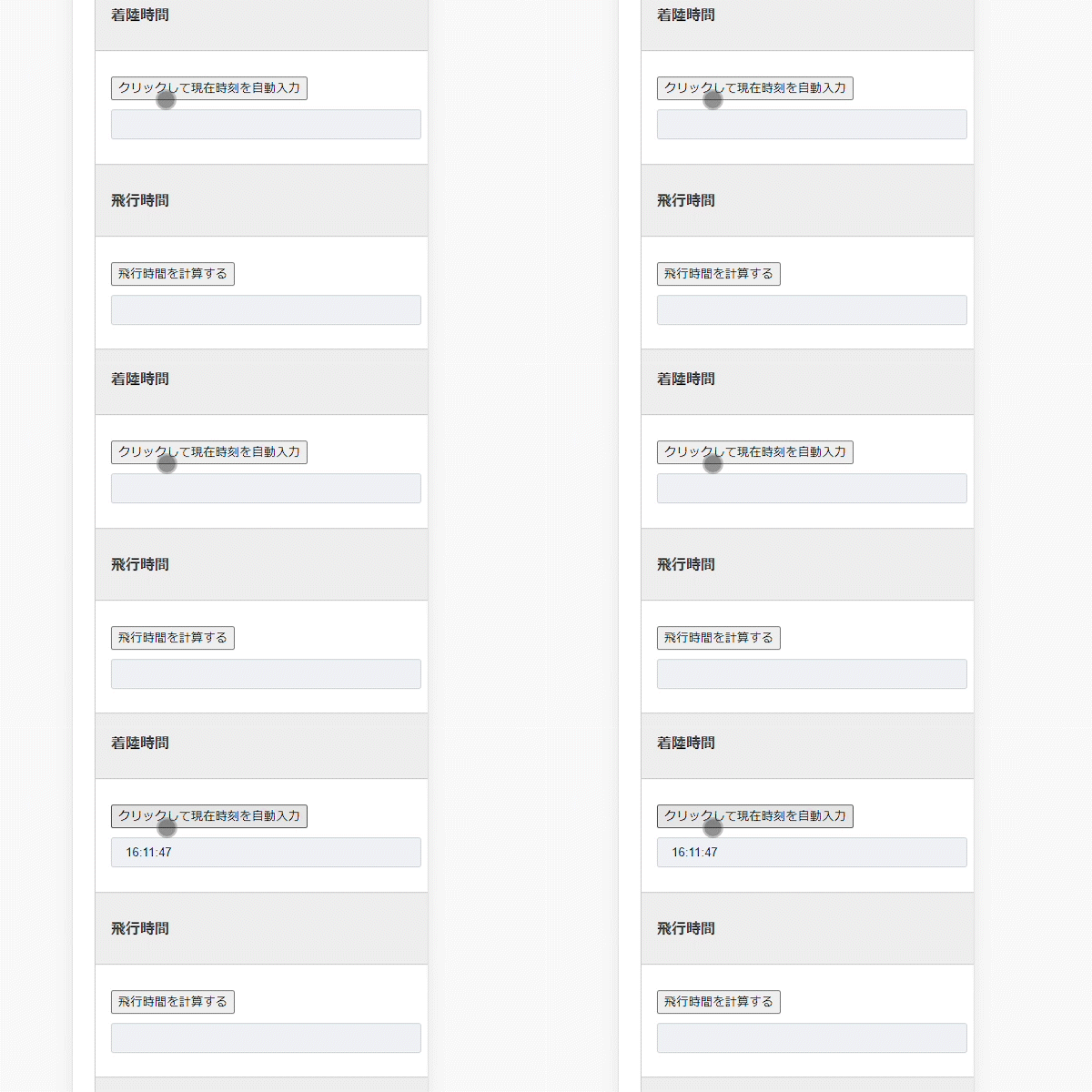
< The goal is to achieve this>
Next is the time setting.
I want to make time setting just as easy, so I'm going to embed the following script:
<script>
function setCurrentTime(id) {
var now = new Date();
var hh = ('0' + now.getHours()).slice(-2);
var mm = ('0' + now.getMinutes()).slice(-2);
var ss = ('0' + now.getSeconds()).slice(-2);
var dateTime = hh + ':' + mm + ':' + ss;
document.getElementById(id).value = dateTime;
}
</script>
Embed this within your contact form.
So, as well as the location button, we also set up a time button.
<input type="button" value="Click to autofill the current time" onclick="setCurrentTime('takeoff-time')">
[text takeoff-time id:takeoff-time class:takeoff-time]/* Your code... */
As with the location, if it is a landing time, change it to landing-time or so and paste it.
Automate flight time calculations >
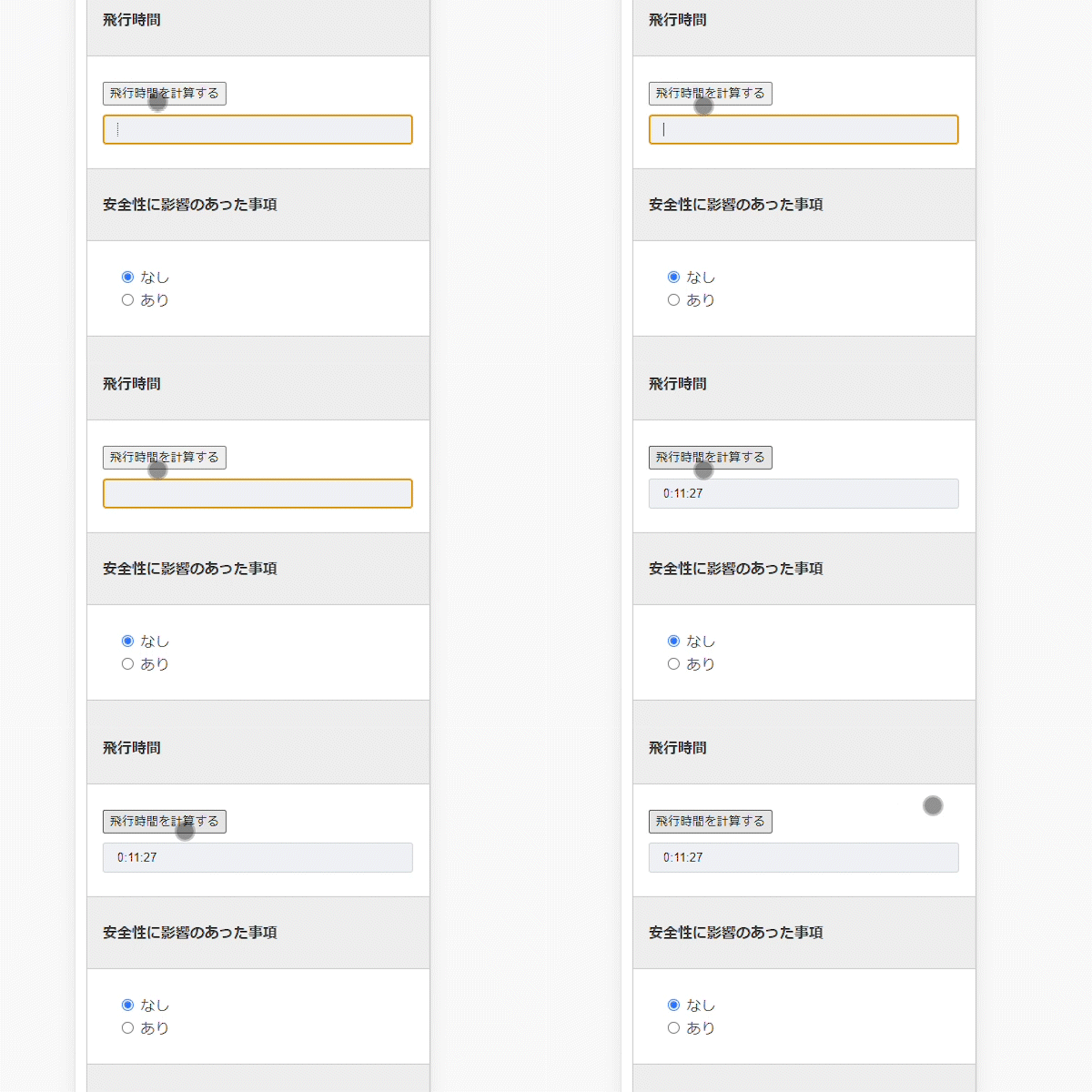
< goal is to become like this>
And then there is the calculation of flight time. If you can get the take-off and landing time, you can have it automatically calculated by embedding the calculation formula from that number.
<script>
function calculateFlightTime() {
var start_time = document.getElementById("takeoff-time").value;
var end_time = document.getElementById("landing-time").value;
if(start_time && end_time) {
var startTime = new Date("2023-03-14 " + start_time);
var endTime = new Date("2023-03-14 " + end_time);
var diff = endTime.getTime() - startTime.getTime();
var hours = Math.floor(diff / (1000 * 60 * 60));
diff -= hours * (1000 * 60 * 60);
var minutes = Math.floor(diff / (1000 * 60));
diff -= minutes * (1000 * 60);
var seconds = Math.floor(diff / (1000));
var flight_time = hours + ":" + ('0' + minutes).slice(-2) + ":" + ('0' + seconds).slice(-2);
document.getElementById("flight-time").value = flight_time;
}
}
</script>
It's a simple formula, but when you click the button, you subtract the take-off time from the landing time and set it to display at 00:00:00 at the place called flight-time.
So, I shortcoded this and wrote the following content in the email form location.
><input type="button" value="calculate flight time" onclick="calculateFlightTime();" >
[text flight-time id:flight-time class:flight-time]
Also, if you make good use of ConditionalFields and set the safety affection or defect with the "Yes" or "None" radio buttons, you can also set the text box to appear only if there is one, so please make good use of it.
summary
The script is summarized, so the final form is as follows:
<script>
Get a take-off and landing location
function setLocation(fieldName) {
if (navigator.geolocation) {
navigator.geolocation.getCurrentPosition(function(position){
var lat = position.coords.latitude;
var lng = position.coords.longitude;
var mapUrl = "https://www.google.com/maps/search/?api=1&query=" + lat + "," + lng;
document.getElementById(fieldName).value = mapUrl;
});
} else {
alert("Geolocation is not supported in this browser.");
}
}
Get time for takeoff and landing
function setCurrentTime(id) {
var now = new Date();
var hh = ('0' + now.getHours()).slice(-2);
var mm = ('0' + now.getMinutes()).slice(-2);
var ss = ('0' + now.getSeconds()).slice(-2);
var dateTime = hh + ':' + mm + ':' + ss;
document.getElementById(id).value = dateTime;
}
Calculate flight time
function calculateFlightTime() {
var start_time = document.getElementById("takeoff-time").value;
var end_time = document.getElementById("landing-time").value;
if(start_time && end_time) {
var startTime = new Date("2023-03-14 " + start_time);
var endTime = new Date("2023-03-14 " + end_time);
var diff = endTime.getTime() - startTime.getTime();
var hours = Math.floor(diff / (1000 * 60 * 60));
diff -= hours * (1000 * 60 * 60);
var minutes = Math.floor(diff / (1000 * 60));
diff -= minutes * (1000 * 60);
var seconds = Math.floor(diff / (1000));
var flight_time = hours + ":" + ('0' + minutes).slice(-2) + ":" + ('0' + seconds).slice(-2);
document.getElementById("flight-time").value = flight_time;
}
}
</script>
I have just created it, and I am about to verify its usability, but I think it is going better than I thought.
With WordPress, if you keep it private and turn it off from search engines, you don't have to worry too much about security compared to the regular web, and you can keep the design as the default WordPress because you only need to know the design.
*If you want to be particular about it, please be particular about it.
In the same way, daily inspections and maintenance records can be performed using contact forms.
Moreover, since you are using WordPress, if you can jump to the information you want to know on the spot, such as the comprehensive approval documents issued by the Ministry of Land, Infrastructure, Transport and Tourism, the link to DIPS, the spreadsheet that aggregates this information, and the emergency airspace check issued by the Ministry of Land, Infrastructure, Transport and Tourism, you can complete everything with just one smartphone.
introduce it and enjoy your drone life!
*All of them have been tested, but please note that we do not guarantee the operation.
*We cannot accept questions about the program.
*This is for those who can install WordPress on the server and those who have used Contact Form 7. If you can't do it, you will be charged, but please feel free to contact us because we will support the installation of WordPress ~ flight logbook, etc.
In addition, if you have a request for drone shooting or video shooting > in the Kansai region, such as , <br /> Please feel free to contact us.